Adaptive UI: The Missing Layer in Agentic AI
tl;dr
Adaptive UI is the gap between what agentic AI can do and how it presents results. There are three distinct layers: predefined components an agent picks from, interfaces generated on the fly, and protocols that let agents 'speak UI' across platforms. They stack, they don't compete, and knowing which layer to reach for is the difference between an AI product that feels like an app and one that feels like a chat window.
We've made real progress standardizing how agents access tools (MCP) and how agents collaborate with each other (A2A). The layer nobody standardized yet is the one users actually see: the interface between agent and human.
In an earlier piece on the shift from chat to agentic AI, the core argument was that agents stop asking questions they can answer themselves. That's the capability side of the shift. This article is about the output side: once an agent has done the work, how does it show what it found?
Right now, the answer is almost always: a paragraph of text in a chat bubble. That's a problem. A paragraph describing your flight options is strictly worse than a flight card. A message saying "please reply with your preferred time" is strictly worse than a rendered date picker. The agent did the hard part. The interface failed the last mile.
That's the gap adaptive UI fills.
What Is Adaptive UI?
Adaptive UI is any mechanism by which an agent delivers a customized interface as part of its response, beyond plain text in a conversation window. It covers a wide spectrum: from a simple card rendered in a chat thread to a fully generated React component to a cross-platform JSON payload that renders as native widgets on web, mobile, and desktop.
What it's not: adaptive UI is not just "generative UI" (that's one specific subset), and it's not just prettier chat (cards inside a chat window count, but the concept goes further). The defining property is that the interface adapts to the agent's output rather than forcing the output to fit a fixed interface.
The practical examples are concrete. Flight cards, booking forms, comparison tables, interactive dashboards, data visualizations, multi-step approval workflows: these are all adaptive UI. Each one replaces a back-and-forth conversation with a purpose-built surface for a specific piece of work.
There are three distinct layers to this. They serve different needs, have different complexity profiles, and are built with different tools. Understanding the layers matters because picking the wrong one for your use case creates real problems: security risks, unpredictable brand experiences, unnecessary cost.
Layer 1: Predefined Components
The simplest and most production-ready form of adaptive UI works like this: you build the UI components ahead of time, and the agent decides which one to use based on context.
The agent doesn't generate any code. It provides intent and data. The application owns the rendering. CopilotKit describes this as "Controlled Generative UI": the agent chooses from a catalog you control.
This approach is already a significant upgrade over text responses. The interface is predictable, matches your design system, performs well (no code-generation overhead), and is straightforward to secure. For most production use cases, this layer covers 80% of what you actually need.
Tools for Layer 1
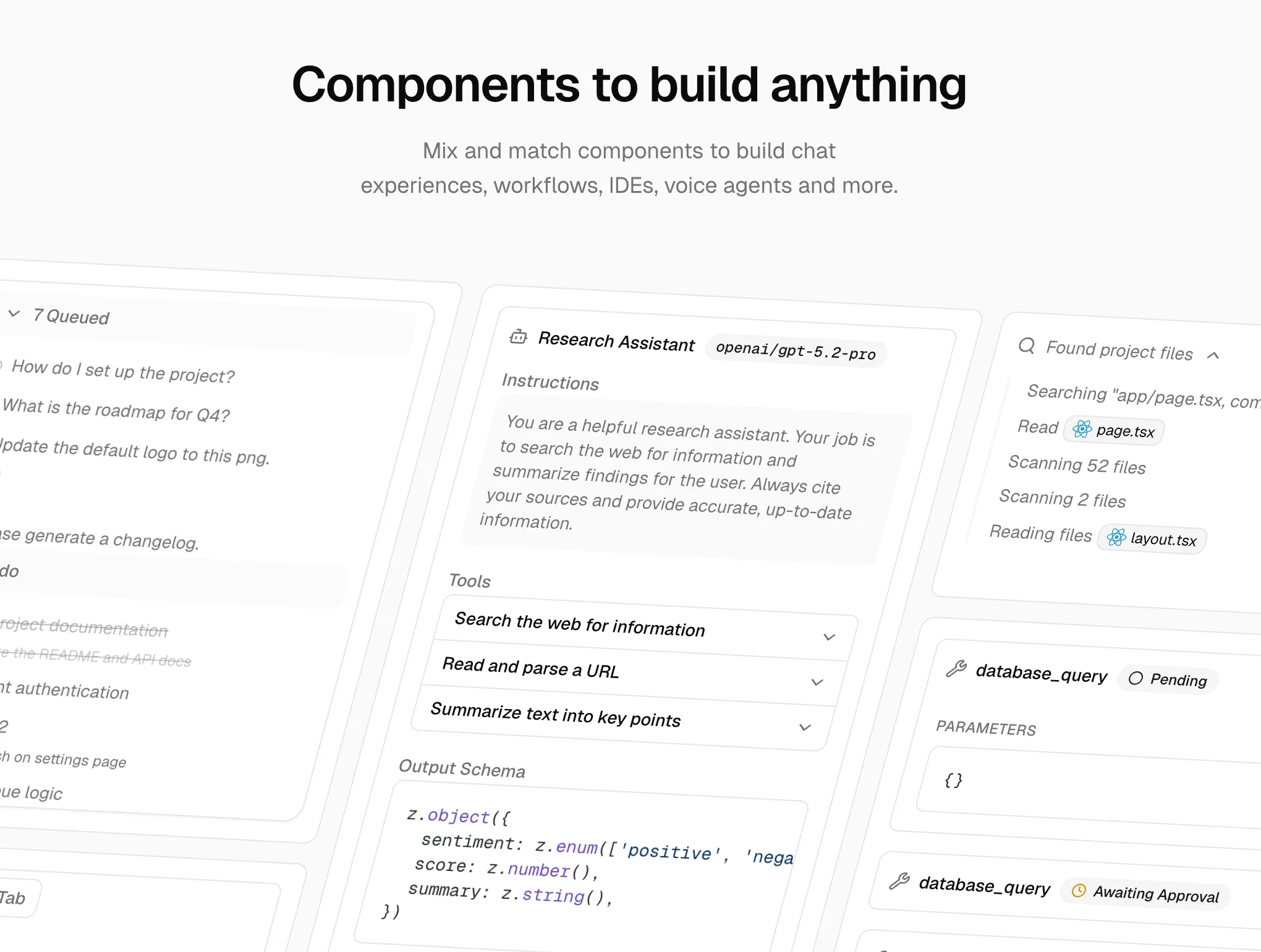
Vercel AI SDK has built-in support for this pattern through the useChat hook with tool invocations. AI SDK Elements extends this with 29+ pre-built, shadcn/ui-based components for chat experiences, workflows, IDEs, and voice agents. If you're already building on Next.js, this is the lowest-friction path to rendering components in response to tool calls.
assistant-ui (Y Combinator W25) is the most popular open-source React library for AI chat interfaces, with over 50,000 monthly npm downloads. It focuses on the chat interface layer with extensive component extensibility, making it a natural choice if you're building on top of an existing chat UI.
Tambo is an open-source React SDK built for this pattern. Developers register their existing React components with a TamboProvider wrapper, and the agent selects from that catalog based on the user's intent. It handles streaming, state management, and MCP integration out of the box. The library supports two component types: generative components (rendered once per message, ideal for charts and summaries) and interactable components (persistent across a conversation, suited for task boards, shopping carts, and dashboards).
Crayon by Thesys takes a similar approach with a focus on SaaS use cases. Developers define response templates that map to React components. Their C1 API is an OpenAI-compatible endpoint that returns structured UI instead of raw text, making it a near drop-in replacement for an LLM API call. More than 300 teams are running Crayon in production.
Where to start
If you're building an AI product today and aren't sure where to begin with adaptive UI, start here. Predefined components are simpler than they sound, the tooling is mature, and the results are immediately visible to users.
Layer 2: Just-in-Time Generative UI
The second layer inverts the model. Instead of picking from a pre-built catalog, the agent generates a custom interface at runtime as part of its response. The UI is purpose-built for a specific query, used once, and potentially discarded. This is ephemeral UI: interfaces that exist only to serve an immediate task, then disappear.
The key distinction from Layer 1: the space of possible outputs is too large or unpredictable for a predefined component catalog. No reasonable set of templates could cover every possible query, so the agent generates the interface on the fly.
Google Search AI Mode is the most visible deployment. A user asks about the physics of the three-body problem, and instead of returning a text summary, Search generates an interactive simulation with visualizations: custom HTML, CSS, and JavaScript rendered directly in the browser. The interface is unique to that query and didn't exist before the user asked.
Google Disco takes this further. It's an experimental AI-first browser from Google Labs where the user enters a prompt and Disco opens "GenTabs": dynamically generated web applications tailored to the task. A meal-planning prompt produces a meal planner app. A trip-planning prompt produces a trip planner. No predefined templates; each tab is a fresh application built on the fly.
Vercel AI SDK streamUI is the developer-facing framework that enables this pattern in your own products. It streams React Server Components from the LLM at runtime, allowing agents to return arbitrary UI as part of a chat response. CopilotKit calls this "Open-ended Generative UI."
The trade-offs are significant, and being explicit about them matters.
Flexibility is maximum: the agent can create any interface for any context, including things you never anticipated. This is what makes it powerful for search engines, exploratory tools, and educational platforms where the output space is effectively infinite.
Cost is substantially higher. Every UI generation is an LLM call that produces code, not just a JSON payload. At scale, this adds up fast.
Latency is slower. Generating and mounting dynamically created code takes meaningfully more time than passing data to a pre-built component.
Brand control is difficult. Generated UI won't match your design system unless you invest heavily in prompting and constraints, and even then, consistency is not guaranteed.
Security requires careful posture. Running LLM-generated code in a sandbox is better than running it directly, but sandboxed iframes still carry risk. The attack surface is larger than a predefined component catalog.
Consistency is inherently unpredictable. The same prompt can produce different interfaces across runs.
Know the trade-offs
Google deploying this at consumer scale in Search and Disco validates the pattern for high-traffic, query-driven use cases where the output space is effectively unbounded. But for most product teams building their own agents, the trade-offs (cost per generation, brand consistency, security surface) still favor Layer 1 for customer-facing products. Layer 2 shines when the space of possible outputs is too large or unpredictable for a predefined component catalog: search engines, exploratory tools, educational platforms.
Thesys's C1 API sits in interesting territory between layers 1 and 2: it uses an API to generate UI through a structured component layer, offering more control than raw code generation while retaining more flexibility than a pure predefined-component approach.
Layer 3: The Protocol Layer
The third layer is architecturally different from the first two. It's not about which components to render or how to generate them. It's about standardizing how an agent describes UI intent so that any client can render it using its own native widgets.
Think of it as the agent saying "show a date picker, a time selector, and a confirm button" in a standardized format, and the receiving client rendering those as native web components, Flutter widgets, React components, or SwiftUI views, whichever is appropriate for that platform.
Two standards are emerging here, with meaningfully different philosophies.
A2UI: Google's Native-First Approach
A2UI (Agent-to-User Interface) is an open-source protocol from Google, released at v0.8 under Apache 2.0 in December 2025. The agent sends a declarative JSON payload describing UI components and layout. The client renders using its own native widgets. One payload, any platform.
The security model is deliberate: A2UI is a declarative data format, not executable code. The agent can only reference components from a client-controlled catalog. There's no UI injection risk because there's no code execution. The client retains full control over styling, branding, and accessibility.
The technical design is also intentionally LLM-friendly. Components are represented as a flat list with ID references rather than a nested tree, which makes incremental generation straightforward. Streaming and progressive rendering are supported natively, so users see the interface assemble in real time rather than waiting for a complete payload.
A2UI sits on top of A2A in Google's agent stack. In a multi-agent setup, a remote agent can send UI payloads via A2A that the orchestrator surfaces to the user. This solves the trust boundary problem: the orchestrator knows which UI came from which agent, and can enforce permissions accordingly.
In production: Google Opal (AI mini-apps platform), Gemini Enterprise workflow automation, Flutter GenUI SDK, and Google Chat integrations are all running on A2UI. AG-UI, the streaming protocol from CopilotKit, has also added A2UI support.
MCP Apps: Anthropic and OpenAI's Web-First Approach
MCP Apps (formally SEP-1865) is an official Model Context Protocol extension, proposed in November 2025 and shipped in January 2026 with support from Anthropic, OpenAI, and the MCP-UI community.
The mechanism is web-native: UI templates are declared as resources with a ui:// URI scheme. Tools reference those UI resources through a _meta field. The host fetches the templates and renders them in sandboxed iframes. Communication between the iframe and the host runs over standard MCP JSON-RPC via postMessage.
The sandboxed iframe is the key security primitive: the UI runs in an isolated context with restricted permissions. Developers use the @modelcontextprotocol/ext-apps package to build apps that can receive tool results, call server tools, and update model context from inside the iframe.
One structural benefit: MCP Apps separates static presentation (the template) from dynamic data (tool results). This enables caching the template while the data updates, which reduces latency for repeated interactions with the same UI surface.
As of January 2026, MCP Apps are live in Claude.ai (web and desktop), Goose, VS Code Insiders, and ChatGPT. Partners with active integrations include Amplitude, Asana, Box, Canva, Clay, Figma, Hex, monday.com, and Slack.
A2UI vs. MCP Apps: Two Valid Bets
| A2UI | MCP Apps | |
|---|---|---|
| Rendering | Native widgets (React, Flutter, SwiftUI) | Sandboxed iframes (HTML) |
| Primary target | Cross-platform, mobile-inclusive | Web-native apps |
| Agent output | Declarative JSON | HTML + JS bundles |
| Security model | No code execution | Iframe sandboxing |
| Status (Mar 2026) | v0.8, Google production | Live: Claude, ChatGPT, VS Code |
| Backed by | Anthropic + OpenAI |
These aren't competing standards that will collapse into one winner. They reflect different platform realities: if you need native mobile rendering alongside web, A2UI's declarative JSON approach travels better. If you're already in the MCP ecosystem and targeting web clients, MCP Apps is the natural extension.
A Note on AG-UI
AG-UI (Agent-User Interaction Protocol), created by CopilotKit and now adopted by Google ADK, LangChain, AWS, Microsoft, and others, deserves a brief mention. AG-UI solves a different problem from the layers above: it's the real-time streaming layer that keeps your agent backend and frontend synchronized, handling tool progress updates, state changes, and human-in-the-loop interactions. It's the plumbing that makes adaptive UI feel responsive rather than the UI system itself. Most builders won't evaluate it directly; it's infrastructure that a framework handles transparently.
How the Layers Fit Together
The mental model that helps: these layers don't compete, they stack.
| What you're solving | Layer | Key players |
|---|---|---|
| Agent accesses tools and data | Tool protocol | MCP |
| Agents collaborate | Agent protocol | A2A |
| Agent describes what to show | UI specification | A2UI, MCP Apps |
| Pre-built UI the agent picks | Component library | Tambo, Crayon, assistant-ui |
| Agent and frontend stay synced | Streaming transport | AG-UI (usually via framework) |
A realistic production stack might use MCP for tool access, A2A for multi-agent orchestration, A2UI or MCP Apps for UI description, Tambo or Crayon for the actual component library, and AG-UI under the hood for the real-time connection. Each layer handles a distinct concern. None of them are in competition.
Two camps are consolidating at the protocol layer:
Web-first (Anthropic + OpenAI): MCP tools, MCP Apps, sandboxed iframes. If your product lives on the web and you're already running MCP servers, this is the coherent path.
Native-first (Google): A2A, A2UI, native widgets across platforms. If you need your agent output to render on mobile, desktop, and web without rebuilding per platform, this is the stronger choice.
The component layer (Tambo, Crayon, assistant-ui) sits above both and works with either. Build your components now. Wire them to whichever protocol makes sense later.
What This Means for Product Teams
The practical guidance follows directly from the layer structure.
Starting out: Layer 1 (predefined components) is the right starting point for almost every team. Pick Tambo or Crayon, register your existing components, and ship. The tooling is mature, the results are immediate, and you can extend later.
Cross-platform requirements: Look at A2UI. The native-first rendering model means one payload works across web, mobile, and desktop. The Google production deployments (Opal, Gemini Enterprise) demonstrate it's ready.
Already in the MCP ecosystem: MCP Apps is the natural extension. It's live in Claude and ChatGPT and requires no new infrastructure if you're already running MCP servers.
Output space too large for a catalog: Just-in-time generation makes sense when the range of possible outputs is too diverse for predefined components. Search engines, exploratory and educational tools, dev tools, and prototyping platforms all fit this pattern. Google Search and Disco demonstrate it at consumer scale; Vercel AI SDK's streamUI lets you build it into your own products.
The standards aren't settled, and that's fine: The component layer (Tambo, Crayon) works regardless of which protocol wins at the specification layer. Build your components now. Wire them to A2UI or MCP Apps when you need to, or when one standard pulls clearly ahead. The investment isn't wasted either way.
The business case is real: AI products that get the interface layer right will feel qualitatively different from those that don't. A backend that orchestrates a complex multi-step workflow and then returns a paragraph of text is leaving value on the floor. The orchestration is invisible to users. The interface is what they experience.
The compounding advantage
Products that invest in the UI layer now build a concrete moat. Not from proprietary technology, but from a design system that agents can fluently use: components that match the brand, components that handle the edge cases, components built for the actual workflows. That catalog takes time to build and is hard to replicate quickly.
The shift from chat to agentic AI changed what agents can do. Adaptive UI is about changing what agents can show. The two advances compound: an agent that can orchestrate complex workflows and present the results as a purpose-built interface isn't just more useful. It feels like a different category of product entirely.
The agents that can show, not just tell, are the ones that will feel indistinguishable from apps.
Key Takeaways
- Adaptive UI has three distinct layers: predefined components, just-in-time generative UI, and protocol-level UI specifications. Each has different trade-offs in cost, control, and complexity.
- Start with Layer 1 (predefined components via Tambo or Crayon). It handles most production use cases, the tooling is mature, and it adds essentially no LLM cost.
- The protocol layer is splitting into two camps: web-first (MCP Apps, backed by Anthropic and OpenAI) and native-first (A2UI, backed by Google). Your platform determines which fits.
- These layers don't compete. A production stack can use MCP for tool access, A2A for agent orchestration, A2UI or MCP Apps for UI specification, and a component library for rendering.
- Build your component catalog now. It works regardless of which protocol wins, and the investment compounds as agents become more capable at choosing the right interface for the right context.
Stay ahead of the agentic AI shift
I write about AI product strategy, agentic systems, and what this means for builders. No spam, just the thinking I find worth sharing.
This article was inspired by content originally written by Mario Ottmann. The long-form version was drafted with the assistance of Claude Code AI and subsequently reviewed and edited by the author for clarity and style.